Crafting
Under Canopies: unlock the Wood Cutter and make planks
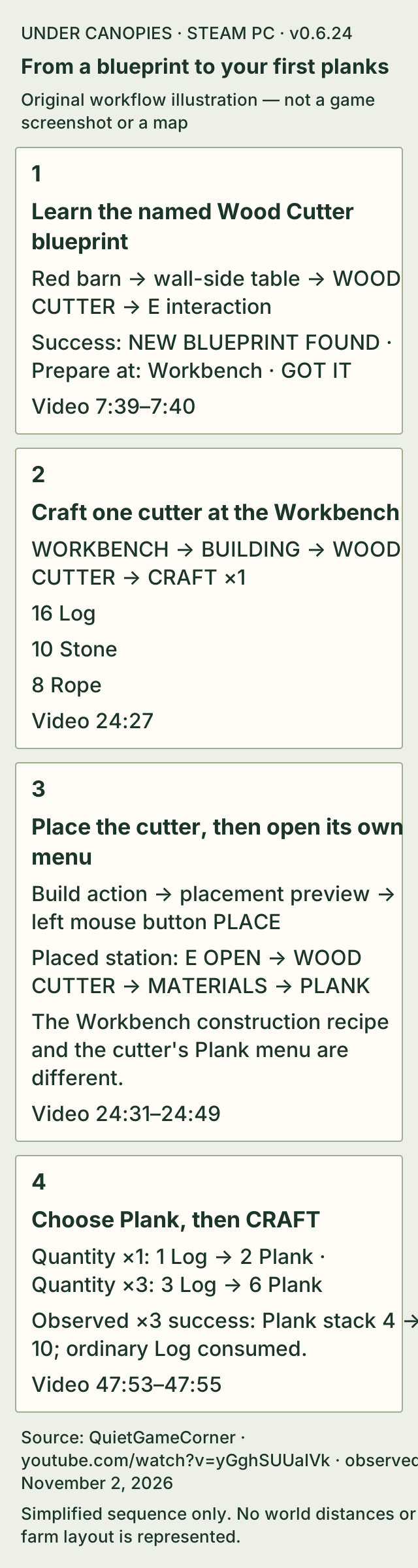
Learn the Wood Cutter blueprint from the long table against the damaged red barn wall at the Old Farm. Target WOOD CUTTER, use its E interaction and check for NEW BLUEPRINT FOUND with Prepare at: Workbench.
Open a placed Workbench, choose Building and craft Wood Cutter with 16 Log, 10 Stone and 8 Rope. Equip the crafted item, enter its displayed build action and left-click PLACE.
Open the placed Wood Cutter with E, select Materials > Plank and choose CRAFT. At x1, 1 Log produces 2 Plank; at x3, 3 Log produces 6 Plank.
On this page
Before you start
- Reach the boarded Old Farm entrance with 10 Sticks and 10 Fiber Plant, repair the door with its onscreen Repair action and enter once E Open appears.
- Learn the Wood Cutter blueprint, rather than only the neighboring Wooden Fence blueprint.
- Have a crafted and placed Workbench. Its Inventory > Building recipe requires 8 Log and 4 Rope; the cutter separately requires 16 Log, 10 Stone and 8 Rope.
Find the Wood Cutter blueprint inside the Old Farm
Inside the damaged red barn, look along the wall for the long wooden table beside a barrel and gray sack. Target the blue sheet whose label is WOOD CUTTER, then use the displayed E interaction.
The neighboring Wooden Fence sheet is a different blueprint. After the correct interaction, the game opens NEW BLUEPRINT FOUND with the name WOOD CUTTER, an explanation that the station turns logs into planks, and Prepare at: Workbench. Choose GOT IT to return to the barn.
- Repair the Old Farm entrance first — Use 10 Sticks and 10 Fiber Plant and check for E Open before looking inside.
Prepare the Workbench and rope
In the ordinary Inventory crafting screen, choose Building > Workbench. One Workbench requires 8 Log and 4 Rope. Craft it and place it before opening its station recipes.
Rope is made in Inventory > Materials > Rope. At x1, the card requires 2 Fiber Plant and outputs 1 Rope. Make 4 Rope for the Workbench and keep another 8 Rope for the cutter.
- Craft the Workbench item — Read the 8 Log and 4 Rope recipe and check that the item was actually produced.
- Make Rope from Fiber Plant — Use the Inventory recipe and check the selected quantity.
Find the recipe in the Workbench's Building category
Open the placed Workbench and select its Building category, marked with a house icon. Select Wood Cutter from that station's recipe list.
If you are looking at the ordinary Inventory crafting screen, or another Workbench category, return to the placed station and its Building list. If you only saw WOODEN FENCE on the discovery screen, return to the farm table for the Wood Cutter sheet.
| Required material | Amount for one Wood Cutter |
|---|---|
| Log | 16 |
| Stone | 10 |
| Rope | 8 |
Craft one cutter, then place it
On the Wood Cutter recipe card, select quantity ×1 and choose CRAFT. PIN RECIPE is a separate button and is not the craft action.
Equip the crafted cutter and use the displayed Build Wood Cutter action to enter its placement preview. The preview's PLACE prompt uses the left mouse button. The mouse wheel rotates the preview; Shift plus the wheel provides fine rotation.
After placement, target the station and use its E OPEN prompt. The Building progression task can show Completed once its material, crafting and placement checks are finished.
Craft Plank and check the actual output
Open the placed cutter with E and check that the station header says WOOD CUTTER. Choose Materials > Plank. Use the plain Plank recipe, which is separate from Soft Wood Plank and Hard Wood Plank.
At x1, the current recipe card requires 1 Log and previews 2 Plank. The source has 3 Log available, shown as 3/1. At x3, the requirement becomes 3 Log and the output becomes 6 Plank.
Choose CRAFT, then check the inventory count. In the observed x3 craft, Plank increases from 4 to 10 and the available ordinary Log count becomes zero. The card then returns to x1 with red 0/1 and a not-enough-resources message for another craft. That red state does not cancel the six planks just made.
| Quantity | Log required | Plank output |
|---|---|---|
| x1 | 1 | 2 |
| x3 | 3 | 6 |
If it does not work
- Wood Cutter is missing from the recipe list
- Check both the station header and its Building category. Then check which farm blueprint you actually learned: Wooden Fence and Wood Cutter are separate sheets.
- The cutter was crafted but there is no station to open
- Crafting the item and placing the station are separate actions. Use its displayed build action and placement preview; the completed station has an E OPEN interaction.
- The menu shows a Wood Cutter construction recipe instead of Plank
- You are still using the Workbench menu. Open the placed cutter and check that the station header reads WOOD CUTTER before choosing Materials.
- Craft turns red after the Plank batch.
- Check the output stack before assuming the craft failed. The source shows Plank 4 to 10 and Log 0/1 after a successful x3 batch; the red requirement is for another craft.
- You are carrying Softwood Logs but plain Plank still lacks Log.
- Read the material name on the selected recipe. The shown plain Plank card requires Log, while Soft Wood Plank and Hard Wood Plank are separate entries. Do not substitute one log type by appearance.
How to know you are done
- NEW BLUEPRINT FOUND names WOOD CUTTER and identifies the Workbench as its preparation station.
- The cutter is placed and its own menu reads WOOD CUTTER > MATERIALS > PLANK.
- The selected craft adds the displayed Plank output to your inventory: two for x1 or six for x3. In the observed x3 batch, the stack changes from 4 to 10 while all three ordinary Log are consumed.
Sources & version
Applies to Steam PC Early Access v0.6.24, visible in QuietGameCorner's November 1 footage on Steam PC (Windows). Sources observed 2026-11-02. Updated 2026-11-02.
QuietGameCorner — Wood Cutter blueprint discovery
7:39 identifies the Wood Cutter sheet and its E interaction; 7:40 shows the named discovery popup. The source does not establish a hold duration.
Cover: a representative official press scene, not a frame from this video or a map of the blueprint location.
QuietGameCorner — Workbench Wood Cutter recipe
24:27 shows the Building recipe, its required amounts and the CRAFT button.
Cover: a representative official press scene, not a frame from this video or a map of the blueprint location.
QuietGameCorner — cutter placement and station menu
24:31 to 24:49 contains the build/placement sequence, completed progression and WOOD CUTTER > MATERIALS > PLANK list.
Cover: a representative official press scene, not a frame from this video or a map of the blueprint location.
QuietGameCorner > Workbench crafting requirements
Inventory > Building > Workbench card shows required 8 Log and 4 Rope; the captured frame is after one Workbench has been crafted.
Cover: a representative official press scene, not a frame from this video or a map of the blueprint location.
QuietGameCorner > Rope recipe
Inventory > Materials > Rope at quantity x1 requires 2 Fiber Plant and shows 1 Rope output.
Cover: a representative official press scene, not a frame from this video or a map of the blueprint location.
QuietGameCorner - Plank recipe and completed batch
47:53 shows x1: one Log for two Plank, with four Plank in inventory. At 47:54 x3 requires three Log for six Plank; by 47:54.6 the inventory has ten Plank and the ordinary Log requirement is red 0/1. No completion toast is claimed.
Cover: a representative official press scene, not a frame from this video or a map of the blueprint location.